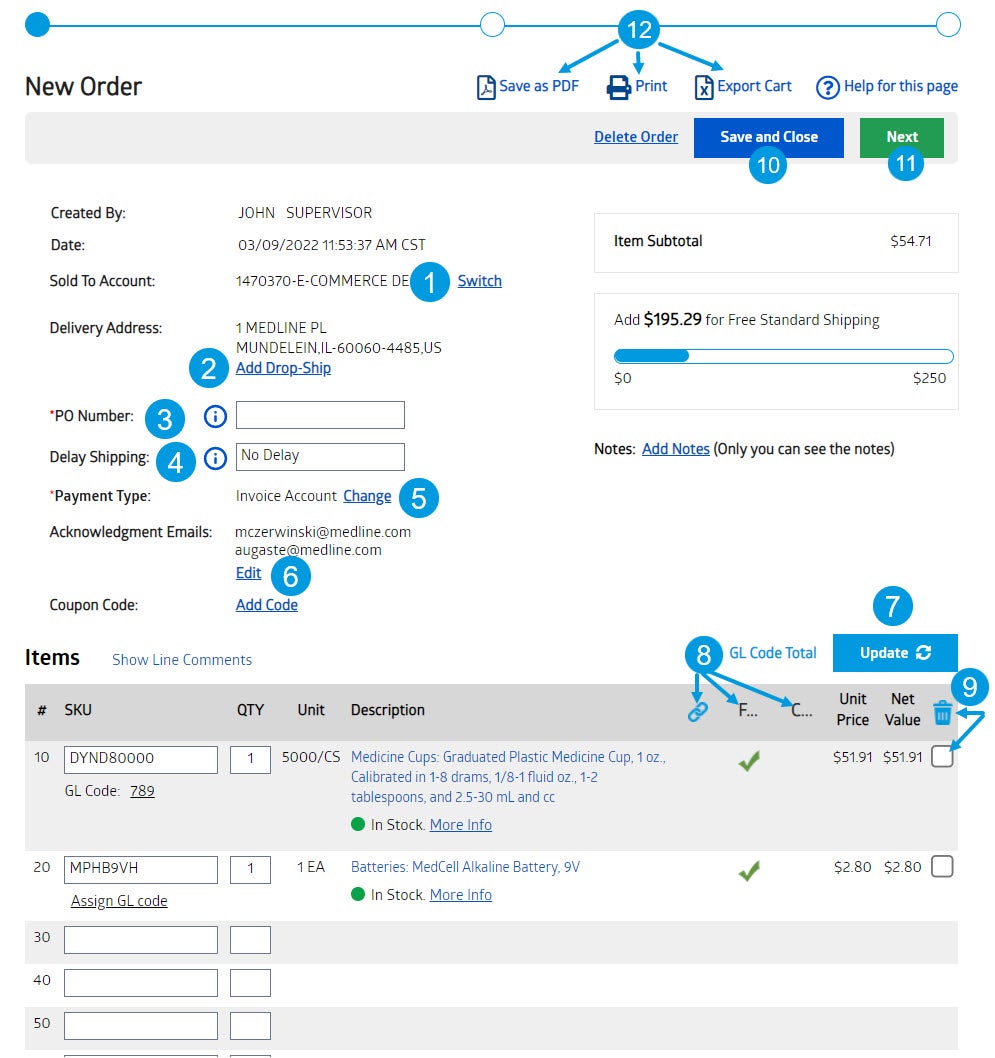
Users that have access to purchase under multiple accounts may switch between accounts in their shopping cart. Customers may only place orders for 1 account, not multiple accounts on one order.
Add a drop ship location to your order if applicable users.
A Purchase Order number is a unique number assigned to an order. If you do not have or use a PO number, you may use as an example the date and your initials.
Delay shipping allows users to set a future date for their item(s) to be shipped on.
Choose between various payment options. A users payment options may be limited by their account settings – if you have any questions or concerns please speak with your Medline sales rep.
6. Users are able to add additional email addresses to receive the acknowledgement email that is sent when the order is placed.
Change the quantities of your order before you submit to Medline, once you type in your new quantity, you may hit Enter or click on the Update button to update quantity and Net Value on the order.
Quickly see which of your items are on contract and/or on your formulary in your shopping cart as well as seeing which items are Account Linked.
Delete items from your cart using the trash can. First select the box to the right of the item(s) and then click on the trash can to delete that line from your order.
Save and close lets you start an order but not submit to Medline, this order will show up under your Un-submitted Orders when clicked.
Clicking Next will take users to the final screen to review their order, clicking on this does not submit your order to Medline just yet, this will take users to their final screen for review to which then they will be able to submit their order.
While in the Shopping Cart, users will have the option to save the order in PDF format, Printing their order, or lastly exporting their order into an Excel document.

Comments
0 comments
Please sign in to leave a comment.